Jenny Mod Models and Skins: The Best Custom Looks for Minecraft
Playing your survival world with the same characters every single day gets really boring after a while. One of the best things about Minecraft is that you can change how basically everything looks. You totally do not have to stick with the basic default look if you are tired of it.If you haven’t installed it yet, start with the Jenny Mod download guide before trying custom models and skins.
Customizing your world is a super fun way to make the game feel brand new again. Most players start by changing their own player look, but you can do the same thing for the characters in your mods. Today, we are going to look at how to totally upgrade your game using 3D shapes and flat outfits. We will start with the big 3D changes first and then talk about the simpler outfit changes later.
What Are Jenny Mod Models?
Many players get confused about what a model actually is. Changing the paint colors is really fun, but what if you want to change the character’s actual shape? That is where Jenny Mod models come in.
Instead of just painting flat clothes onto a blocky body, these files actually change the 3D blocks inside the game. So, what is the big difference?
- Models: A brand new 3D shape that changes her physical body, adds real hair that sticks out, or gives her 3D items like a hat.
- Skins: A flat, 2D drawing of an outfit that just wraps around the blocks.
Using a Jenny mod custom model is awesome because it adds cool 3D details like real hair, big backpacks, and tall boots. This stops her from looking like a stiff, normal mob and makes your whole game feel brand new.
If you’re new to the mod, it helps to understand what the Jenny Mod actually does before exploring cosmetic changes.
Top Custom Models You Can Download Right Now
If you want to try out some totally new 3D shapes, there are tons of amazing characters made by fans. Here is a list of some of the most popular Jenny Mod custom models you can grab right now to totally change your game.
Bunny Girl Jenny Mod Model
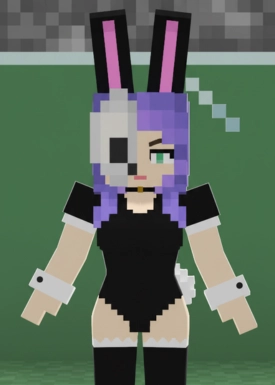
This one changes her into a cute bunny girl. Instead of normal clothes, she gets a black outfit, long 3D bunny ears that stick up from her head, and a little fluffy tail. It is a really popular look for anime fans.
Aayla Secura Jenny Mod Model
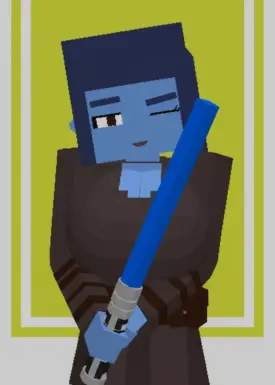
Star Wars fans will absolutely love this one. It completely turns her into the cool blue Jedi Knight from the movies. She gets the blue skin and the special head tails that the Twi’lek aliens have in the movies.
Emmy Jenny Mod Model
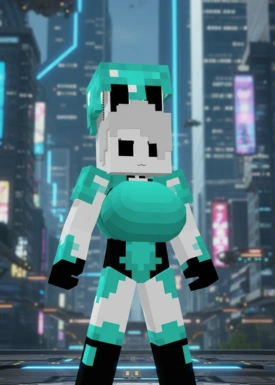
This gives her a really cool, futuristic robot look. The model features a white and teal sci-fi outfit with black markings on her face. If you are building a space base or a futuristic city, this model fits in perfectly.
Vivian Zone Zero Jenny Mod Model
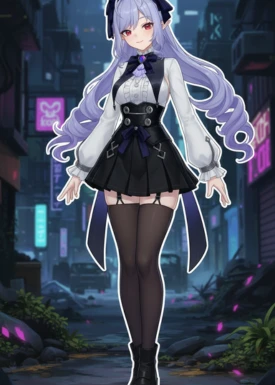
If you play other video games, you might know this one. This model gives her long light-purple hair inspired by Vivian from the Zenless Zone Zero game. The hair actually flows down her back in 3D.
FK Halloween Jenny Mod Model
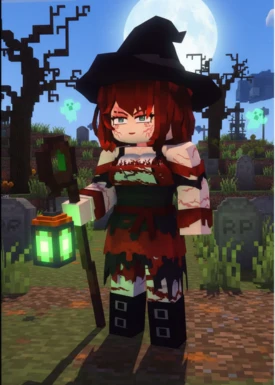
This is perfect for scary maps or playing in October. It turns her into a spooky pirate maid. The model adds stitches, a cool 3D pirate hat, and messy red hair. It looks super creepy but also really detailed.
Dorothy Jenny Mod Model
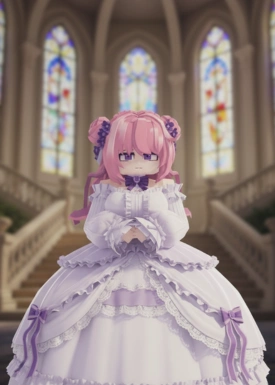
This one is just super cute. It gives her a big, frilly Gothic dress that sticks out in 3D. She also gets pink space-bun hair with little violet flowers in it. It is perfect if you live in a fairy tale castle.
Nicole Demara Jenny Mod Model
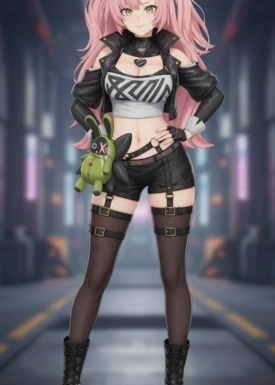
This is another favorite from Zenless Zone Zero. This model gives her sassy pink hair and a highly detailed mercenary outfit. The clothes have a lot of 3D depth to them, so it doesn’t look flat at all.
Asa Mitaka Jenny Mod Model
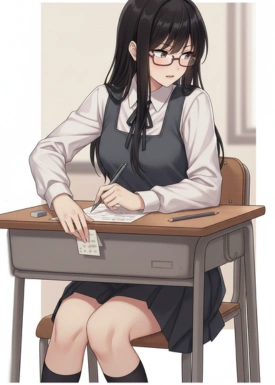
Fans of the Chainsaw Man anime use this to make her look just like Asa. It features long black hair parted down the middle and her classic school uniform.
Senko San Jenny Mod Model
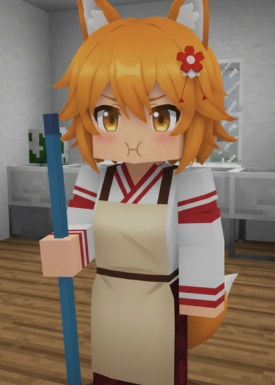
This turns her into an adorable fox girl. The best part of this model is the huge, fluffy 3D ears and the big fox tail. It makes her look super friendly and cute while she follows you around.
Mitsuri Kanroji Jenny Mod Model
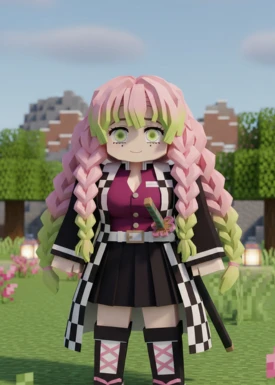
Demon Slayer fans can use this to give her that famous pink and green braided hair. The braids actually hang down in 3D, and she has her proper demon slayer uniform on.
Yorha Jenny Mod Model
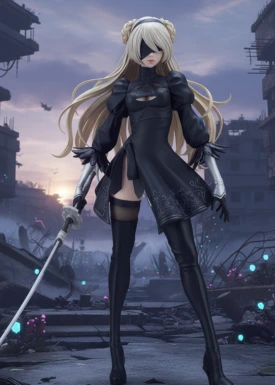
This completely transforms her into 2B, the awesome combat android from the NieR: Automata game. It has her black blindfold and her cool black dress. It looks awesome when she is fighting zombies.
Accurate Christmas Jenny Mod Model

A really nice winter model that dresses her up like a holiday elf. She gets a 3D Santa hat, elf ears, and candy cane props. It is super fun to use when it is snowing in your Minecraft world.
Accurate Jenny Mod Model
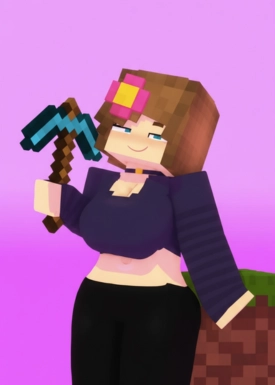
This is the classic, old-school look. It upgrades her basic casual goth outfit and gives her an actual 3D yellow flower in her brown hair. It just makes the original character look much higher quality.
Grok AI Jenny Mod Model
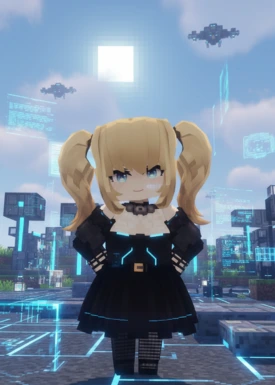
This turns her into a futuristic AI companion. The model gives her bright blonde pigtails that stick out on the sides and big blue eyes.
Director Vivian Jenny Mod Model
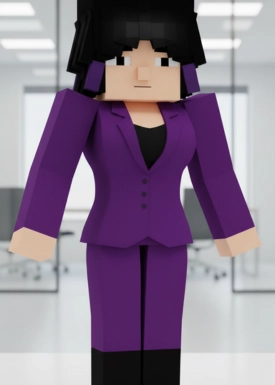
This gives her a very modern, boss-like style. She has dark hair with bangs and wears a sharp purple outfit. It looks very clean and professional.
Where to Find a Jenny Mod Custom Models Download
Finding these cool 3D files is actually super easy, but you have to be careful about clicking on sketchy websites. Here is the safest way to download your new character models without ruining your computer:
- Stay Safe Online: Be careful, because not every website is safe from computer viruses.
- Use Trusted Sites: Always look for a Jenny Mod custom models download link on big community websites like jennymodsminecraft.com .
- Download the File: Once you find a safe page, just download the zip file to your computer.
- Move the Zip File: Drop that downloaded file right into your Minecraft “resourcepacks” folder.
- Turn it On: Open your game options menu, turn the pack on, and your new 3D character will show up right away!
How to Change Your Jenny Mod Skin
We already looked at the big 3D models. But what if you just want an easy way to change her clothes? If you don’t want to mess with complicated 3D shapes, downloading new Jenny mod skins is definitely the best option for you.
What exactly is a skin?
- It is basically just a flat picture that wraps around the character to give them a fresh outfit.
- You can easily find hundreds of free clothes online to try out.
- Players love finding a unique Minecraft skin Jenny Mod design, like tough diamond armor for fighting, a warm winter jacket for snow biomes, or just casual summer clothes.
Many skin updates were introduced by the creator behind Jenny Mod in later versions.
Grabbing a Full Jenny Mod Skin Pack
Looking on the internet for a single new outfit every time you want to change your shirt gets super annoying. You don’t want to waste your time doing that.
To fix this, a lot of creative players put together a massive Jenny mod skin pack that you can download all at once. When you get one of these, you get a huge folder filled with dozens of different Minecraft Jenny Mod skins to pick from.
Why skin packs are awesome:
- If you get tired of her wearing a red shirt on Monday, you can just click and swap to a blue one on Tuesday.
- You get a ton of choices right there on your computer.
- It stops you from ever getting bored with the same look.
Some custom skins are designed specifically for all Jenny Mod characters available in the mod.
Making Your Own Jenny Mod Custom Skins
If you cannot find an outfit you like online, you can just draw one yourself. Search for the Nova Skin Minecraft Jenny Mod editor to pull her body up on your screen. Then, you just pick your colors and paint whatever clothes you want. Before applying certain skins, you’ll need to know how to find Jenny in the game.
When you finish drawing, just click save to download your new Jenny mod custom skins to your computer. Next, you just slide that new picture right into your game folder. This makes your world unique because nobody else has that exact outfit!
Frequently Asked Questions (FAQs)
Are custom skins and models free to use?
Yes, they are totally free. Fans make them in their spare time and share them online for fun. You should never have to pay real money just to get a new outfit.
Will a 3D model make my game lag?
Usually, no. If your computer runs normal Minecraft fine, you will be okay. But super detailed 3D files might slow down an old laptop a little bit.
Can I use these on my phone or iPad?
This is really tricky. Most of these high-quality files are only made for the PC version. Trying to put them on a mobile phone usually just makes them glitch out or turn invisible.
How do I install a skin or model?
It is super easy to do. You just download the file and drop it straight into your game’s “resourcepacks” folder. Then, just turn it on in your game options!
Where is the safest place to download them?
Always stick to big community websites like 9Minecraft, Planet Minecraft, or safe Discord groups. Doing this keeps your computer totally safe from bad viruses.
Conclusion
If you want to make your old survival world feel exciting again, downloading fresh Jenny mod skins is the easiest way to start. It is super fast to do and completely changes her look. This lets you match her outfit to whatever kind of adventure you are playing today.
If you really want to blow your friends away, installing high-quality Jenny Mod Models is the absolute best choice. Seeing characters walk around with actual 3D hair and detailed outfits makes your world incredibly realistic. It is honestly the coolest way to customize your own special story.